Finally got around to posting a video of the mourning doves that lived in our tomato plant last summer. I was working from home at the time, and this was the window right next to my desk, so I have a lot of videos and photos, but this is one of the more interesting ones: feeding time!
Wednesday, January 20, 2010

Thursday, December 3, 2009
Dapple
On vacation in Paris last month we visited the Musee D'Orsay to see some of the classics of Impressionism. One of my current favorites (and one of the most expensive paintings ever sold) is Renoir's Bal du Moulin de la Galette:
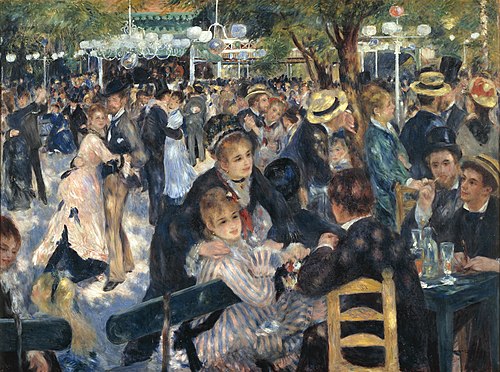
What I particularly like about this painting is Renoir's careful depiction of sunlight dappling through trees. Look at the man in the foreground, facing away from us, with the curious round dabs of sunlight across his back. If you focus on this point and think about it, the appearance of the dapples seems a little strange, yet holistically it feels right.
In fact, what Renoir has captured here is a true optical curiosity. As
discussed by Marcel Minnaert in Light and Color in the Outdoors, sunlight dappling through trees often produces these beautiful, perfectly round or elliptical spots of light:

As Minnaert points out: "the surprising thing is that all these images have the same shape, although it is obviously impossible that all the holes and slits in the foliage happen to have the same shape."
This happens because holes in foliage that are sufficiently small result in dapples whose shape is dominated by the image of the sun, i.e. a disc, rather than the shape of the hole. If the sun were a mere point source rather than having a significant diameter, we would not see this effect. (I believe that the shape of the spot of light produced is essentially just the image of the sun, scaled by the projection throw length and then convolved with the shape of the hole, neglecting diffraction effects...)
This effect is most dramatic when something distorts or obscures the image of the sun. A classic example is the change in the appearance of tree dapples during a solar eclipse: as the sun becomes obscured, its image becomes crescent shaped, as do its dapples through the trees:
Update: new eclipse photo, this time at annular stage:

Monday, September 14, 2009

Wednesday, August 19, 2009
In the Styx
In The Amazing Adventures of Kavalier and Clay, Michael Chabon uses the idiom "out in the sticks", meaning "in the boondocks", "in the middle of nowhere". According to EtymOnline, this idiom arose around 1905, simply from the meaning of sticks as in trees as in a rural place.
I've heard the phrase plenty of times, but this must be the first time I've seen it (or at least first time I've noted it) in print. Without really thinking about it, my mental image of this phrase had always been "out in the Styx". Which of course, now that I actually think about it, seems pretty unlikely. Definitely more fun my way though...
Thursday, August 13, 2009
Marketing Coup
Overdone sales mailer from The Economist: "Handle with care. Contents may inspire."
Roget's Thesaurus:
Inspire: to breathe in
Synonyms: inhale, gasp, suck
Thursday, August 6, 2009
Work around Selenium IDE's iteration deficiency with Prototype JavaScript evals
Selenium IDE, the FireFox testing plugin, is a nice tool. One of its limitations is the lack of straightforward methods for iterating or doing other control flow during tests. This is one reason to switch to writing tests in Selenium RC. However, it is sometimes possible to work around the limitations from within Selenium IDE by evaluating arbitrary JavaScript. In particular, Rails applications using the standard Prototype JavaScript library have available some nice ways to iterate over elements.
For example, I recently wanted to write a Selenium IDE test to clear the shopping cart for a web app. To do this, I needed to iterate over all the elements in the cart, set their quantity to 0, and then update the cart. To accomplish the iterative set quantity to 0, we can use the getEval method to run arbitrary JavaScript: selenium.browserbot.getUserWindow().document.body.select('input[id^="line_item_"][id$="_quantity"]').each(function(elem){elem.value = 0}).
Going through this piece by piece:
  // This gets us the user window.
  // Older versions might use getCurrentWindow() instead.
  selenium.browserbot.getUserWindow()

  // Gets us down to the document body
  // Because this is a standard Rails app,
  // body has already been extended with Prototype.
  // select() invokes Prototype's $$() CSS selector.
  document.body.select

  // These are CSS3 attribute selectors
  // Basically we want to match id="line_item_*_quantity".
  // May require FireFox >= 3
  input[id^="line_item_"][id$="_quantity"]

  // Prototype's Enumerable.each() does the iteration,
  // with an anonymous function setting the values.
  each(function(elem){elem.value = 0})
Wednesday, August 5, 2009
Getting Selenium to wait for Ajax requests
Update: See here for one caveat in using Ajax.activeRequestCount.
Using Selenium IDE to test Ajax, you can usually use a waitFor condition reflecting on DOM elements to tell you when Ajax calls have returned. However, if you just want to wait until all Ajax requests have returned without relying on testing against page elements, there is this approach:
Command: waitForCondition
Target:  selenium.browserbot.getUserWindow().Ajax.activeRequestCount == 0
Value:   10000
This works for Prototype based Ajax pages, e.g. standard Rails. If you're using a different JavaScript library, you'll need to use a different call; see here for some possibilities.
(For earlier versions of Selenium, you might need to use getCurrentWindow() instead.)
Going back to earlier revisions in Subversion
There are basically two different scenarios where you will want to rewind (AKA roll back, revert) your code base to an earlier version.
- You just want to have an earlier version of the code, but don't need to work-on / commit-against the earlier revision.
- You actually want to roll your project back to an earlier version and then work-on / commit-against the project with the earlier revision as your starting point.
#2 is considerably more complicated. There are hacky ways to handle it, but the "proper" method is described here: http://jacwright.com/blog/75/how-to-roll-back-changes-using-subversion/
Monday, August 3, 2009
next as a way to return from a block
In Ruby, you can't return from a block with return; this will instead return from the enclosing method; if there is no enclosing method (i.e. you are at toplevel), this will throw an error.
However, the Ruby next statement takes an argument, and seems to work as a means to return from a block without breaking out of any enclosing context.
Demonstration:
def yielder
 ret = yield
 puts 'After yield'
 return ret
end
Now from irb:
>> VERSION
=> "1.8.6"

>> yielder{1}
After yield
=> 1

>> yielder{return 1} # This tries to return from toplevel...
LocalJumpError: unexpected return

>> yielder{break 1} # This breaks completely out of the call to yielder...
=> 1

>> yielder{next 1; puts 'In block'} # Aha! This breaks out of the block but stays in the method!
After yield
=> 1
As an example of how this can be useful:
  mixed_collection.sort do |x,y|
    next x.class.name <=> y.class.name if x.class != y.class
    x <=> y
  end
My main question at this point is, does this work in Ruby 1.9?
Update: Works in Ruby 1.9.1
Subscribe to:
Posts (Atom)